How to Geocode Addresses with BAN (Base Adresse Nationale) API

If you're working with French addresses, the Base Adresse Nationale (BAN) is your best friend. It's France's official address database, maintained by local authorities and IGN (Institut Géographique National), and it's completely free to use. Whether you need to geocode a single address or process thousands, BAN provides authoritative, accurate results without the licensing restrictions or costs of commercial providers.
Unlike commercial geocoding services that charge per request and restrict how you can use the data, BAN offers unlimited free geocoding with a permissive open license. This makes it ideal for French organizations, government agencies, and anyone building applications focused on France.
Important update: As of 2025, the BAN API has been migrated to the Géoplateforme service managed by IGN. The old endpoint
api-adresse.data.gouv.fris deprecated and will be decommissioned in January 2026. This tutorial covers the new Géoplateforme service endpoints. (Source)Note: BAN only handles addresses - it doesn't geocode business names, landmarks, or POIs (Points of Interest). For those, you'll need a commercial provider like Google Maps or HERE. But for pure address geocoding in France, BAN is unmatched.
Table of contents:
Introduction: Why use BAN?
Before we dive into the how-to, let's understand why BAN is special and when it makes sense to use it.
What is BAN?
The Base Adresse Nationale (BAN) is France's official national address database. It contains over 25 million addresses compiled from local authority data across all French communes, including overseas territories. What makes BAN unique is that it's:
- Authoritative - maintained by official French authorities (IGN and local governments)
- Comprehensive - covers every commune in France, including rural areas and small localities
- Accurate - provides exact rooftop coordinates rather than interpolated guesses
- Free - completely free to use with no quotas or charges
- Open - fully open license allowing storage, reuse, and redistribution
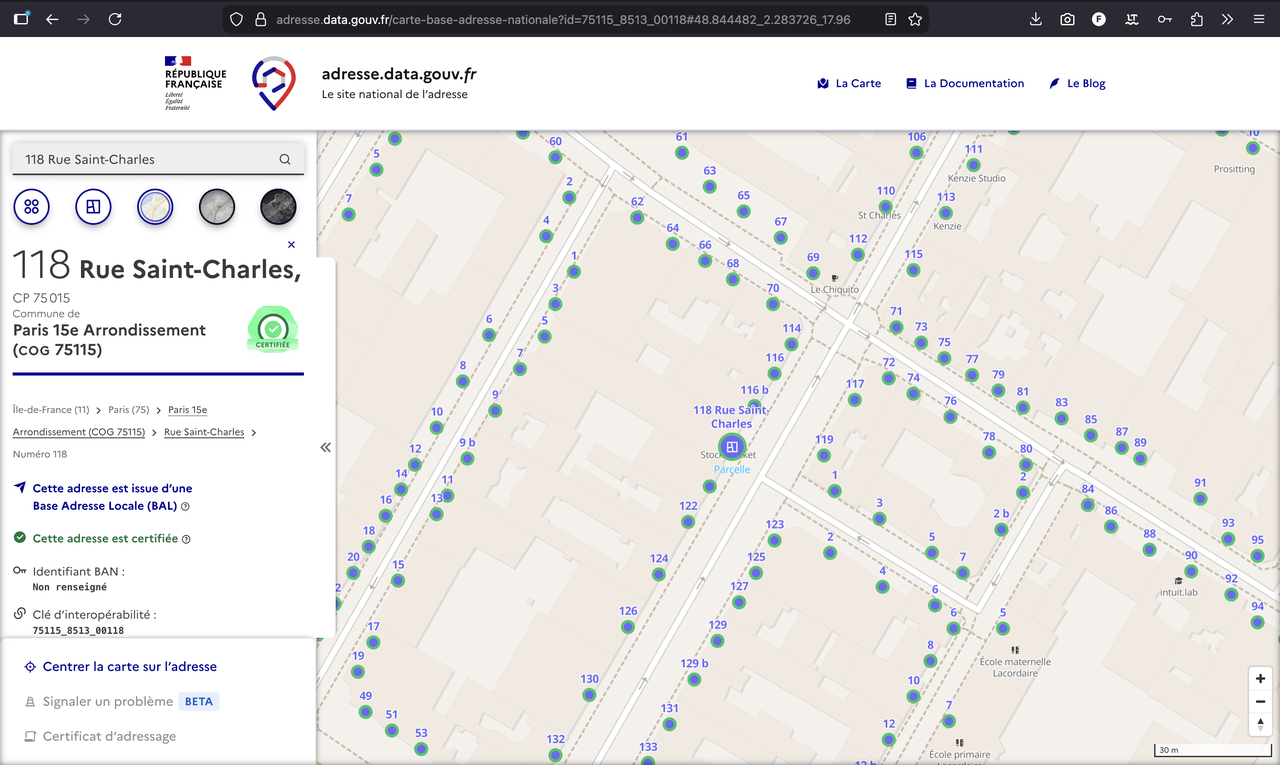
Here is an example of a BAN address, shown in the official visualization tool:
When to use BAN
BAN is perfect when you: - Need to geocode French addresses (metropolitan France and overseas territories) - Want authoritative, government-maintained data - Need to avoid commercial licensing restrictions - Are building applications that require address validation - Want to geocode large volumes without cost concerns - Need to store and reuse geocoded coordinates permanently
Why BAN works so well: Since BAN is updated by local authorities who know their addresses intimately, it provides exact coordinates rather than estimates. This is especially valuable for rural addresses and small localities that commercial providers might struggle with.
When BAN isn't the right choice
BAN won't work if you need to: - Geocode addresses outside of France - Find businesses, landmarks, or POIs by name - Handle natural language queries or typos (BAN requires well-formatted addresses) - Need real-time business information (hours, ratings, etc.)
For these use cases, you'll want to consider commercial providers like Google Maps, HERE, or Mapbox.
Single address geocoding
Let's start with the simplest use case: geocoding a single address. This is perfect when you need to convert one address into coordinates, perhaps for a form validation or a single lookup.
The new endpoint & parameters (2026)
The BAN geocoding service is now provided through the Géoplateforme service managed by IGN. The endpoint for forward geocoding is:
https://data.geopf.fr/geocodage/search
Important: The old endpoint api-adresse.data.gouv.fr is deprecated and will be decommissioned in January 2026. You should migrate to the new Géoplateforme endpoint. (Source)
This /search endpoint accepts the following parameters:
-
q(required): The address to geocode -
limit(optional): Number of results to return (default is 10) -
autocomplete(optional): Enables autocomplete mode (default is true)
Other parameters are available to precise the geocoding context (e.g. city, postal code, etc.), but I won't cover them here. For the full list of parameters, consult the OpenAPI documentation.
Example request
Here's an example with the address "118 Rue St Charles, Paris":
GET https://data.geopf.fr/geocodage/search?q=118+Rue+St+Charles,+Paris&limit=1
And it returns:
{
  "type": "FeatureCollection",
  "features": [
    {
      "type": "Feature",
      "geometry": {
        "type": "Point",
        "coordinates": [2.283496, 48.844484]
      },
      "properties": {
        "label": "118 Rue Saint-Charles 75015 Paris",
        "score": 0.7424048484848483,
        "housenumber": "118",
        "id": "75115_8513_00118",
        "name": "118 Rue Saint-Charles",
        "postcode": "75015",
        "citycode": "75115",
        "x": 647415.92,
        "y": 6860731.63,
        "city": "Paris",
        "district": "Paris 15e Arrondissement",
        "context": "75, Paris, Île-de-France",
        "type": "housenumber",
        "importance": 0.83312,
        "street": "Rue Saint-Charles",
        "_type": "address"
      }
    }
  ],
  "query": "118 rue st charles, Paris"
}
In this example, we added a limit of 1 to get only one result. The API returns its best guess for the address, ordered by the match score.
What happens? The API searches its database for addresses matching your query and returns a list of possible matches. The response includes the exact coordinates, formatted address, and additional metadata like postal code and city.
The response
The API returns a GeoJSON FeatureCollection. Each feature contains:
-
ID - the unique identifier of the address in the BAN database (
properties.id) -
Coordinates - latitude and longitude in the
geometry.coordinatesfield (format:[longitude, latitude]). They are also available asxandyin thepropertiesobject. -
Formatted address - the standardized address label in
properties.label -
Address components -
housenumber,street,city,postcode,citycode, etc. The housenumber and street name will be mising if not found. - Importance - estimated importance of the address in the database (0-1 scale)
- Score - relevance score indicating match quality between your query and the result (0-1 scale)
Note: Results are returned ordered by score (highest first), so the first result is typically the best match. However, always verify the address components (especially city and postal code) to ensure the result is correct, as we'll explain in the next section.
The match score
The API returns a confidence score between 0 and 1. However, a high score doesn't mean the address is correct, and it definitely doesn't mean the address exists.
Take our "118 Rue St Charles, Paris" example. The top result scores 0.74, which sounds reasonable. But peek at the second result at 0.62 - it points to "Rue Charles Paris 33130 Bègles". That's 500km away in Bordeaux's suburbs!
Even trickier: search for "17 Rue St Charles, Paris" and you'll get a respectable 0.74 score... except this address doesn't exist. The API found something that looks similar, but it's matching strings, not verifying reality.
The takeaway? Always sanity-check geocoding results. The score tells you how well your query matched something in the database, not whether that something is what you actually wanted.
Batch geocoding: processing multiple addresses
When you have many addresses to geocode - whether it's a spreadsheet with customer addresses or a database export - you'll want to use batch geocoding. BAN offers two approaches: a web interface for one-time tasks and an API for automation.
Method 1: Using the BAN web interface
The easiest way to geocode a CSV file is through BAN's web interface. This is perfect if you're not a developer or if you're doing a one-time batch job.
Here is how to do it:
- Prepare your CSV file - Include columns with address data (street number, street name, postal code, city). Export from Excel if needed.
- Upload to BAN CSV tool - Select which columns contain your address components (e.g., Numéro, Rue, Ville).
-
Download results - Get your original data plus coordinates, formatted addresses, and
result_statuscolumn.
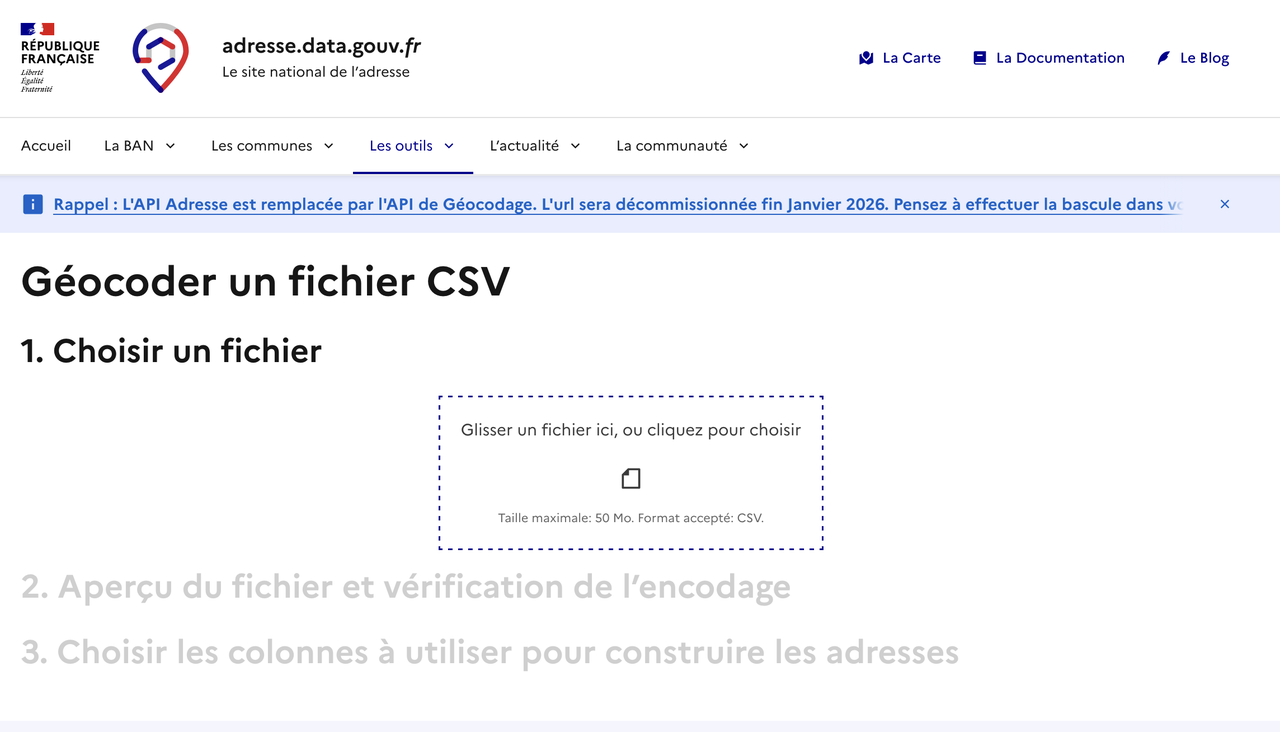
And you're done: once you specified
Method 2: Using the BAN API
For automation, integration into applications, or regular batch processing, you'll want to use the BAN API directly. This gives you full control over the process and lets you build custom workflows.
Understanding batch geocoding with the API
The Géoplateforme service provides a dedicated batch geocoding endpoint that accepts CSV files. This is the recommended approach for processing multiple addresses programmatically.
The batch endpoint is available at https://data.geopf.fr/geocodage/batch/.
The request should be a POST request with the CSV file in the request body. It accept several important parameters:
- columns: the columns to concatenate the address. It can be left empty to use all columns.
- indexes: the column to use as index. It's useful to be able to identify the address in the original CSV file.
Note: You still can make multiple requests to the /search endpoint, one for each address, but this will be less efficient than using the batch endpoint.
Example request
Here is an example of a CSV file with the addresses to geocode:
id,rue,street,city,postal_code
1,12.0,Avenue des Champs-Élysées,Paris,75008
2,45.0,Rue de la République,Lyon,69002
3,78.0,Boulevard de la Croisette,Cannes,6400
4,,,???????,
5,156.0,Rue Saint-Honoré,Paris,75001
In this case, the columns to concatenate the address are: rue, street, city, postal_code, so we can specify columns=rue,street,city,postal_code.
The request should be:
POST https://data.geopf.fr/geocodage/search/csv
data=addresses.csv
columns=rue,street,city,postal_code
The response will be a CSV file too, returning both the original data and the geocoded data with new columns all prefixed with result_ (result_score, result_score_next, result_label, result_type, result_id, result_housenumber, result_name, result_street, result_postcode, result_city, result_context, result_citycode, result_oldcitycode, result_oldcity, result_district, result_status).
id;rue;street;city;postal_code;longitude;latitude;result_score;result_score_next;result_label;result_type;result_id;result_housenumber;result_name;result_street;result_postcode;result_city;result_context;result_citycode;result_oldcitycode;result_oldcity;result_district;result_status
1;12;Avenue des Champs-Élysées;Paris;75008;2.302859;48.871285;0.8596027272727272;0.6467871900826445;Avenue des Champs Elysées 75008 Paris;street;75108_1733;;Avenue des Champs Elysées;Avenue des Champs Elysées;75008;Paris;75, Paris, Île-de-France;75108;;;Paris 8e Arrondissement;ok
2;45;Rue de la République;Lyon;69002;4.835859;45.761928;0.9157595187165776;0.6972321052631578;45 Rue de la République 69002 Lyon;housenumber;69382_6005_00045;45;45 Rue de la République;Rue de la République;69002;Lyon;69, Rhône, Auvergne-Rhône-Alpes;69382;;;Lyon 2e Arrondissement;ok
3;78;Boulevard de la Croisette;Cannes;06400;7.032336;43.54684;0.9329795565410199;;78 Boulevard de la Croisette 06400 Cannes;housenumber;06029_0880_00078;78;78 Boulevard de la Croisette;Boulevard de la Croisette;06400;Cannes;06, Alpes-Maritimes, Provence-Alpes-Côte d'Azur;06029;;;;ok
4;;;???????;;;;;;;;;;;;;;;;;;;skipped
5;156;Rue Saint-Honoré;Paris;75001;2.339989;48.862052;0.9164409090909089;0.6147660173160173;156 Rue Saint-Honoré 75001 Paris;housenumber;75101_8635_00156;156;156 Rue Saint-Honoré;Rue Saint-Honoré;75001;Paris;75, Paris, Île-de-France;75101;;;Paris 1er Arrondissement;ok
The result_status column contains "ok" if the address was geocoded successfully, "skipped" if the address was not geocoded successfully.
Interesting! In batch CSV mode, the API only returns one result per row. However, you can still now the score of the second best match in the result_score_next column.
Usage and cost
BAN is completely free to use, with no hidden costs or quotas. This makes it an excellent choice for organizations of any size.
Cost structure
- API usage: FREE - No charges for API requests
- No quotas - Process as many addresses as you need
- No subscription fees - No monthly or annual costs
- Database download: FREE - You can download the entire BAN database for free
Why BAN is free: BAN is a public service maintained by French government agencies. It's funded by taxpayers and provided as open data to benefit French society and economy.
If you're processing millions of addresses or need offline access, you can download the complete BAN database and run your own geocoding locally.
For a detailed comparison with commercial providers (Google Maps, HERE, Mapbox...), check out my Best Geocoding Providers for France guide.
Rate limits
BAN allows 50 requests per second per IP. If you exceed this, you'll get HTTP 429 errors. Throttle to ~40/second and you'll be fine.
Wrapping up
BAN is free, accurate, and open. For French addresses, it's hard to beat. Just remember: migrate to the new Géoplateforme endpoint (data.geopf.fr) before January 2026 if you're still using the old one.
Full API reference: Géoplateforme OpenAPI documentation.
To get a full overview of the geocoding providers for France and a comparison between them, check out our guide: Best Geocoding Providers for France.
Last updated: 2025-01-15 | Updated by: François Andrieux | Sources: BAN API Documentation, CSV Geocoding Tool, API Migration Announcement, Géoplateforme Capabilities, Géoplateforme OpenAPI Documentation
Disclaimer: This guide is for informational purposes. Always refer to official BAN and Géoplateforme documentation for current endpoints and terms.